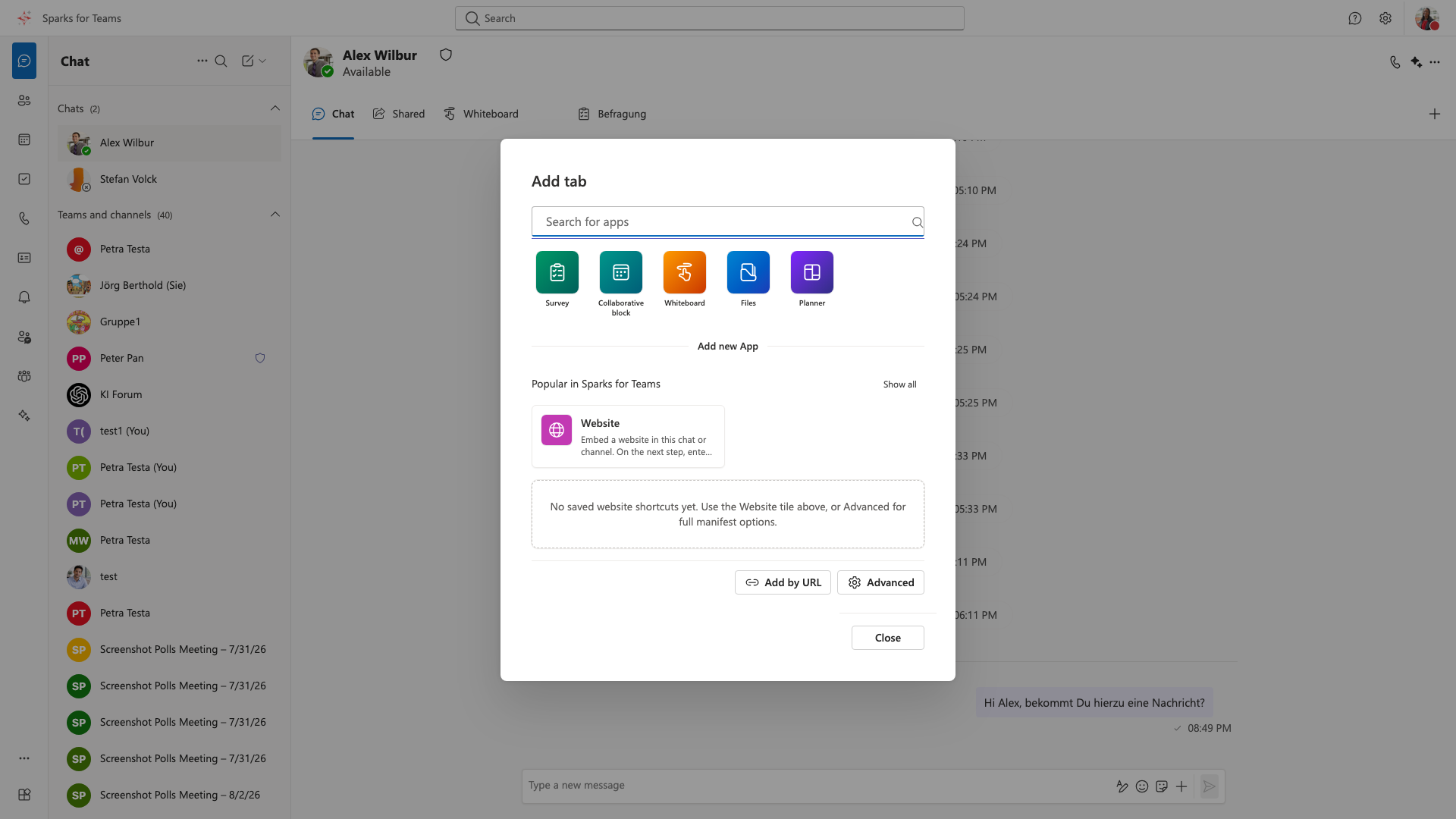
Dialog: Add Tab
How to Open
- Open a chat room or channel
- Click “+” or “Add Tab” / “Apps” in the tab bar
- The dialog shows quick starters, search, categories, and the app list
Options
Built-in tabs / quick starters
| Tab | Description |
|---|---|
| Survey | Polls in chat/channel (tab title Survey) |
| Whiteboard | Excalidraw |
| Collaborative block | Checklist, agenda, notes |
| Files | WebDAV / Sparks Cloud |
| Sparks Planner | Pick or create a plan → tab shows only that plan. Sparks plans are linked to the room (agent/todos). See Planner in chats & meetings. |
Website / custom tabs
- Embed external web apps via URL (“Website”)
- Enter a valid HTTP or HTTPS URL
- Examples: shared Google Docs, Notion, Confluence, internal dashboards
- Note: Sites with
X-Frame-Options: DENYorSAMEORIGINblock embedding — see Custom Tabs
Import Teams manifest
- Use “Import Teams manifest” (or “Get more apps”) to upload a Teams
manifest.json - Sparks creates the tab from
staticTabs/configurableTabs - Apps with SSO (
webApplicationInfo) may require the app vendor to authorize the Sparks client ID — see Developer documentation
Microsoft tabs from Teams
When signed in with Microsoft and permission granted, tabs already pinned in Microsoft Teams (Graph) can also appear in the tab bar (MS chat/channels or linked Matrix rooms). This is separate from manifest import.
Workflow
- Open room/channel
- Click “+” / “Add Tab”
- Pick an app (search or category), configure a website URL, or import a manifest
- The tab appears next to the conversation
Manage
- Right-click on tab header:
- Rename (where supported; not all MS tabs)
- Remove
- Open in new window (Whiteboard, Custom)
- Order: drag & drop (if supported)
Note: In Microsoft Teams Chat/Channels, “Apps” often opens the App Store dialog (Graph/widgets) — separate from Matrix “Add tab”.
Limitations
- Custom / website tabs: Some sites do not allow embedding (security policies)
- On errors: Check URL, prefer HTTPS, try a different URL
- Right-click → Open in new window bypasses iframe restrictions
- SSO third-party apps: Full token compatibility only with partner whitelist
📸 Screenshot: